- Welcome to Dolibarr ERP / CRM.


Recent posts
#1
Dolibarr Dashboards / Dolibarr BI
Last post by admin - Nov 15, 2025, 10:25 AM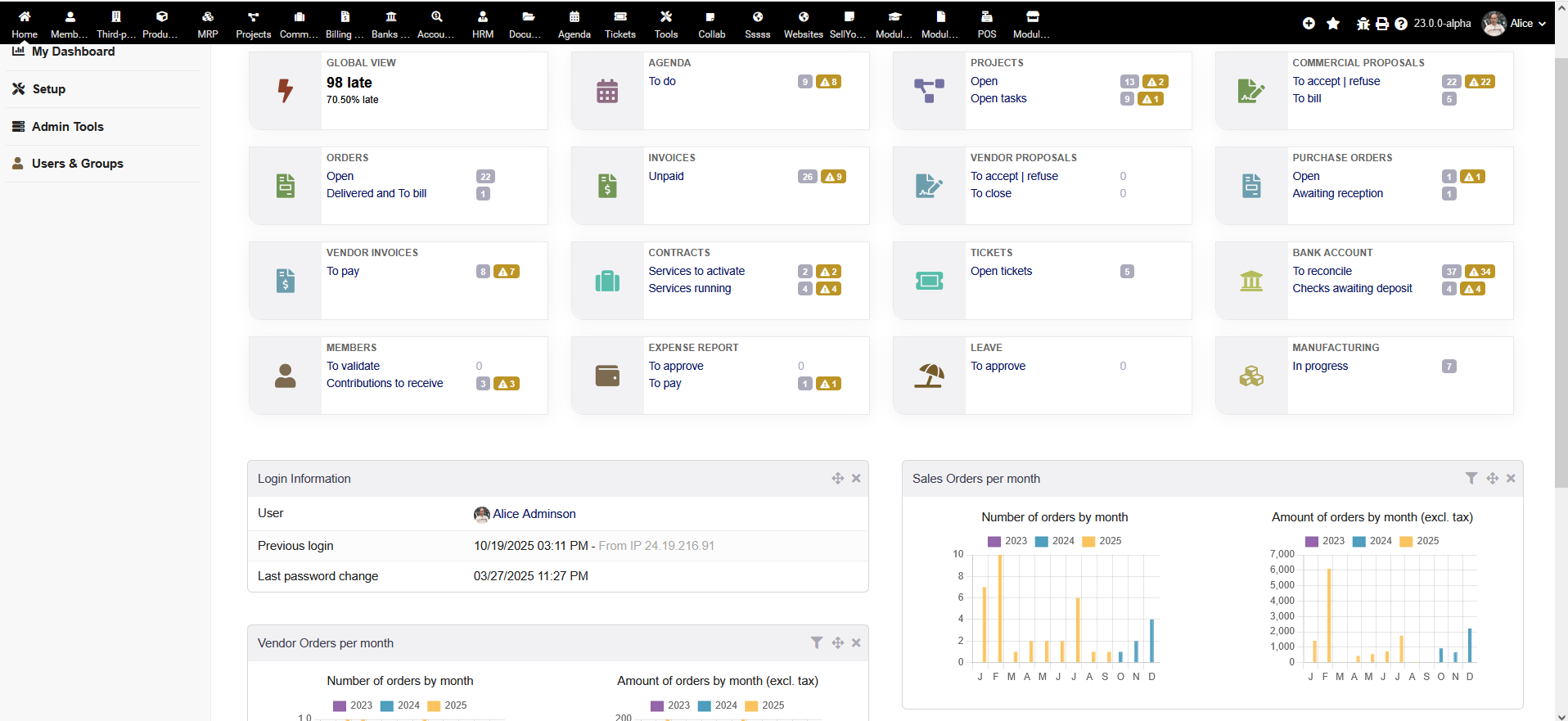
Widget-based system
Dashboards are built from small, reusable components called widgets that pull data from different modules.
Customizable
Users can personalize their dashboards to show the most relevant information, such as financial summaries, sales graphs, or inventory alerts.
Role-specific views
Dashboards can be customized to cater to the specific needs of different user roles, like finance or sales.
Real-time data
Some dashboards can display data that updates in real-time, helping teams stay synchronized.
Centralized information
They provide a single place for users to access important data and key performance indicators (KPIs) without having to navigate through multiple modules.
Example widgets
Common widgets include summaries of turnover, overdue invoices, sales performance graphs, inventory levels, and upcoming tasks or reminders.
#2
Services Provided / Services Information
Last post by admin - Nov 11, 2025, 04:04 PMClouds-R.Us lives on an AWS EC2 Ubuntu Linux instance with Plesk as the server / hosting manager. Subdomain clients get their own Plesk control panel for data and file access. (see attached)
Clouds-R.Us provides data conversion services for Sage 100 and Intuit QBO/QBE to Dolibarr ERP / CRM.
Clouds-R.Us offers custom Dolibarr modules and interfaces.
Extended support beyond the peer Clouds-R.Us forum is available at an affordable billing rate.
Contact: support@clouds-r.us
Clouds-R.Us provides data conversion services for Sage 100 and Intuit QBO/QBE to Dolibarr ERP / CRM.
Clouds-R.Us offers custom Dolibarr modules and interfaces.
Extended support beyond the peer Clouds-R.Us forum is available at an affordable billing rate.
Contact: support@clouds-r.us
#3
CMS & Website / CMS & Website
Last post by admin - Nov 10, 2025, 02:09 AMWebsite creation
Build a website from scratch using HTML, CSS, and JavaScript, or import a live website via URL.
Content management
Organize content into containers and add new pages.
Dynamic content integration
Link dynamic content from your ERP system, such as products or customer information, directly to your website.
Integrated editor
Use the website editor without any technical knowledge, as it includes its own web server for previews.
Import options
Import a website from a URL or a template from the Dolibarr marketplace.
Simplified workflow
Eliminate the need to install and manage a separate CMS by integrating website management into your ERP/CRM.
Build a website from scratch using HTML, CSS, and JavaScript, or import a live website via URL.
Content management
Organize content into containers and add new pages.
Dynamic content integration
Link dynamic content from your ERP system, such as products or customer information, directly to your website.
Integrated editor
Use the website editor without any technical knowledge, as it includes its own web server for previews.
Import options
Import a website from a URL or a template from the Dolibarr marketplace.
Simplified workflow
Eliminate the need to install and manage a separate CMS by integrating website management into your ERP/CRM.
#4
Point Of Sale / POS
Last post by admin - Nov 10, 2025, 02:06 AMMulti-terminal and multi-user
Create multiple POS terminals (cash registers) that can be managed by an unlimited number of users through the web interface.
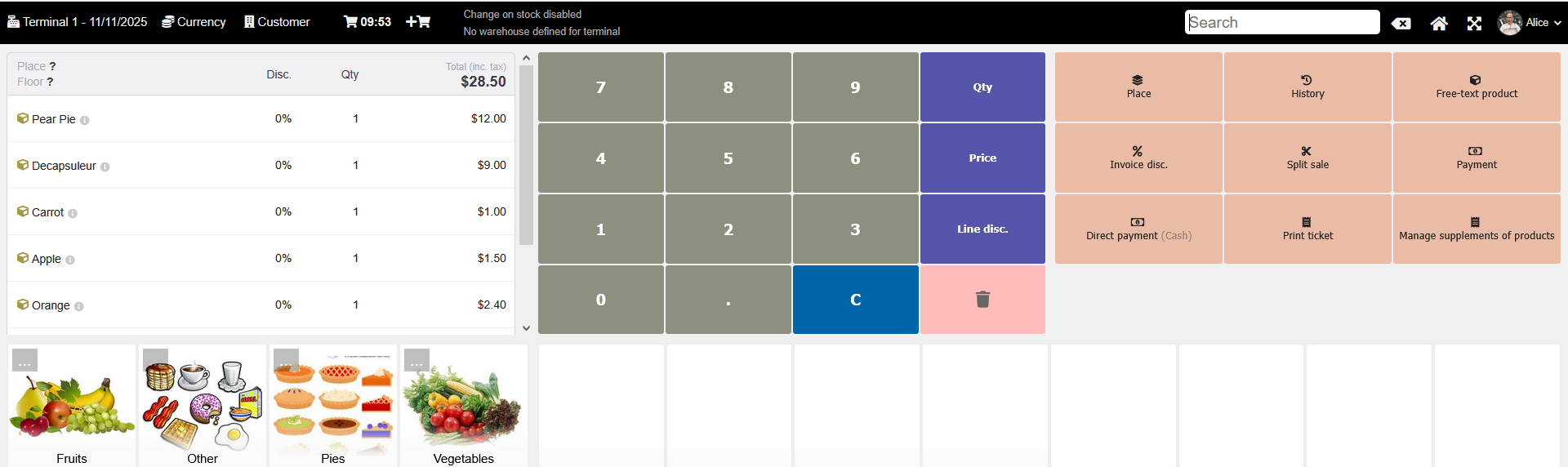
Intuitive interface
Includes a touch and responsive interface that is compatible with touchscreens, barcode readers, order printers, and scales.
Parallel sales
The system allows for managing multiple sales at the same time, as seen in a "grouping" feature in the TakePos Plus extension.
Inventory management
Automatically decreases stock levels when a sale is completed, with real-time updates when linked to specific warehouses.
Payment and invoice management
Supports multiple payment modes and sessions, allows for adding discounts by percentage or price, and can handle multiple payments per invoice.
Customer and order management
You can associate sales with specific customers or a generic customer, and offers the ability to send invoices via email.
Restaurant-specific features
Supports management of rooms and tables for bars and restaurants.
QR code ordering
Allows customers to place their own orders by scanning a QR code.
#5
Mass Emailing / Mass Emailing
Last post by admin - Nov 10, 2025, 02:03 AMCampaign creation
Create and send mass emails directly from the platform, without needing an external tool.
Recipient management
Select recipients from pre-defined lists, such as customers, partners, and suppliers, with options to filter by conditions or even import a CSV file.
Content creation
Build emails using a WYSIWYG or HTML editor and attach files as needed.
Personalization
Personalize emails by pulling data directly from your Dolibarr database, such as a customer's name or invoice number.
Performance tracking
Monitor the success of your campaigns with statistics like open rates, click-through rates, and unsubscribe numbers.
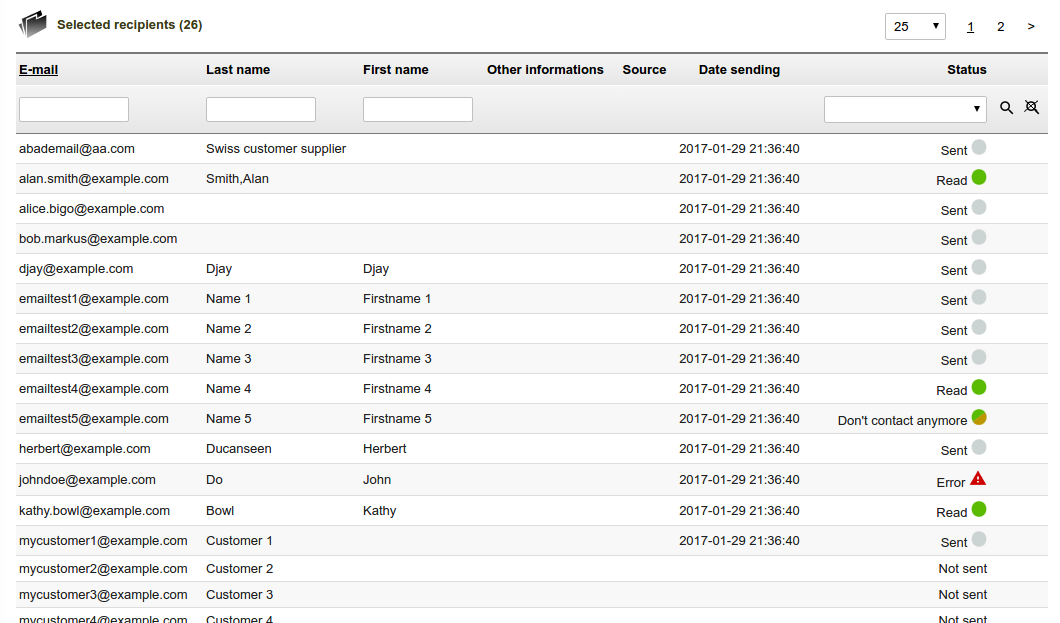
Automation
Automate tasks like sending a welcome email when a new contact subscribes or trigger emails based on specific events, such as an overdue invoice.
Testing
Send test emails to validate your setup before launching a campaign.
External integration
Configure the module to send mail via an external SMTP server for better deliverability, or connect to third-party marketing tools like Mailchimp via API for more advanced features.
Create and send mass emails directly from the platform, without needing an external tool.
Recipient management
Select recipients from pre-defined lists, such as customers, partners, and suppliers, with options to filter by conditions or even import a CSV file.
Content creation
Build emails using a WYSIWYG or HTML editor and attach files as needed.
Personalization
Personalize emails by pulling data directly from your Dolibarr database, such as a customer's name or invoice number.
Performance tracking
Monitor the success of your campaigns with statistics like open rates, click-through rates, and unsubscribe numbers.
Automation
Automate tasks like sending a welcome email when a new contact subscribes or trigger emails based on specific events, such as an overdue invoice.
Testing
Send test emails to validate your setup before launching a campaign.
External integration
Configure the module to send mail via an external SMTP server for better deliverability, or connect to third-party marketing tools like Mailchimp via API for more advanced features.
#6
Surveys & Polls / Surveys and Polls
Last post by admin - Nov 10, 2025, 01:59 AMCustomizable polls
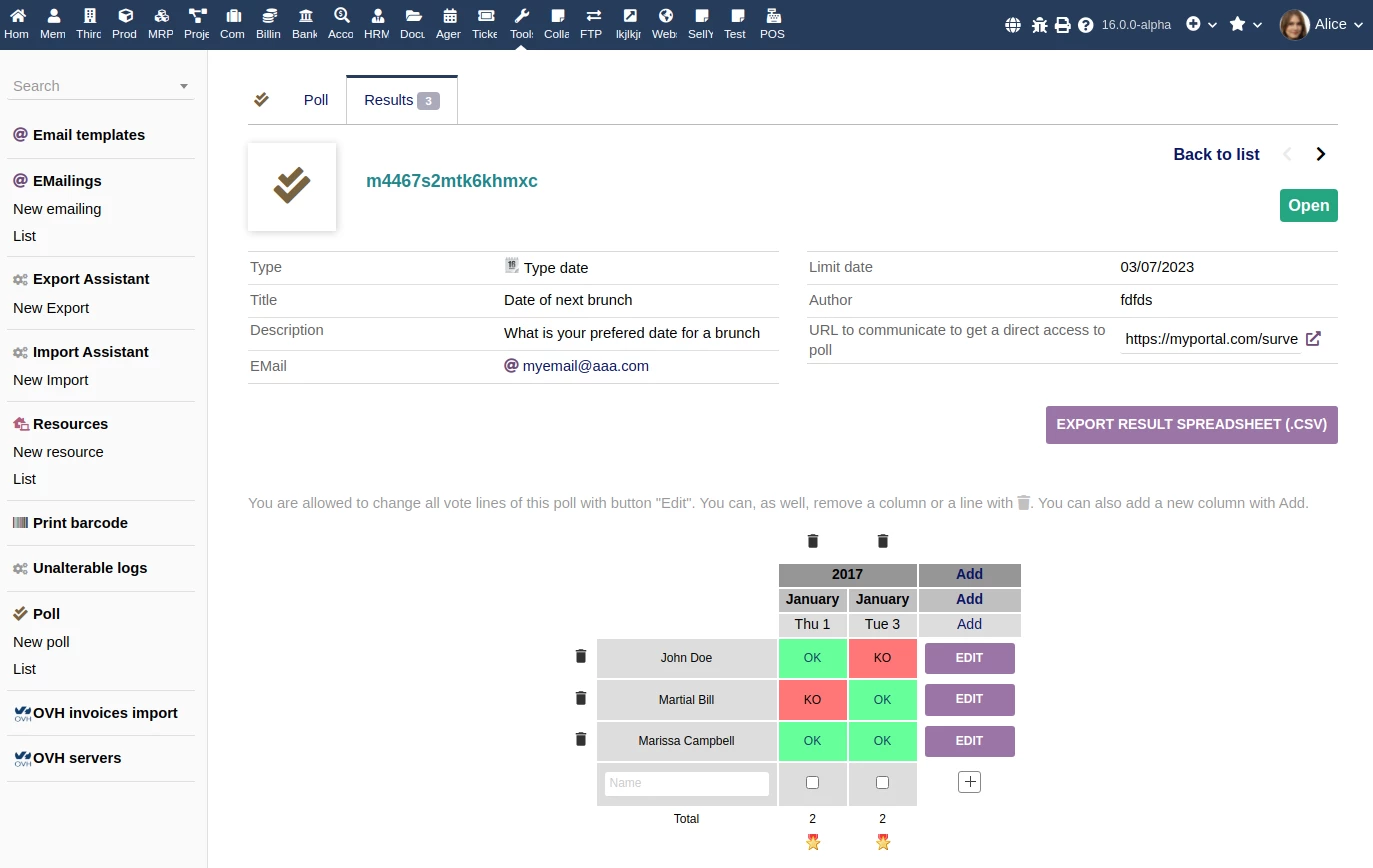
Create surveys with different question types, including standard vote/for-against options, date polls for scheduling, or simple checkboxes.
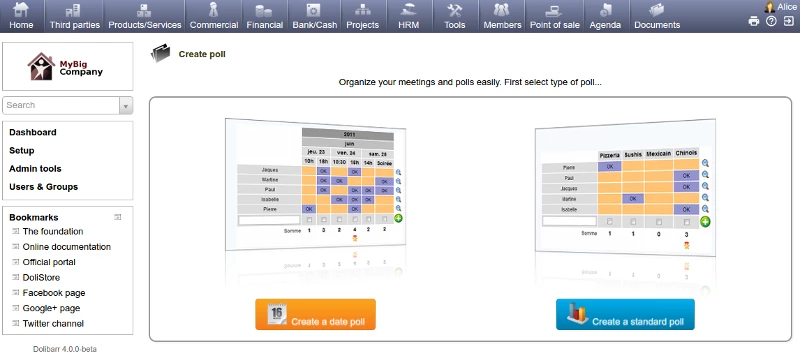
Public or private access
Choose to make your polls public via a URL or private to a select group of contacts.
Automated actions
Trigger actions based on poll responses, such as sending reminder emails for feedback or tagging clients based on their rating.
Data analysis
Analyze survey results to identify trends and areas for improvement.
CRM integration
Link survey responses to customer profiles in the CRM module to get a complete picture of customer satisfaction.
Event organization
Use the module for event-related activities, such as collecting votes for an election or gathering applications for a conference.
Create surveys with different question types, including standard vote/for-against options, date polls for scheduling, or simple checkboxes.
Public or private access
Choose to make your polls public via a URL or private to a select group of contacts.
Automated actions
Trigger actions based on poll responses, such as sending reminder emails for feedback or tagging clients based on their rating.
Data analysis
Analyze survey results to identify trends and areas for improvement.
CRM integration
Link survey responses to customer profiles in the CRM module to get a complete picture of customer satisfaction.
Event organization
Use the module for event-related activities, such as collecting votes for an election or gathering applications for a conference.
#7
Connectivity & Interfaces / Connectivity & Interfaces
Last post by admin - Nov 10, 2025, 01:48 AM- REST API: Provides a standardized way for external applications to interact with Dolibarr, enabling CRUD (Create, Read, Update, Delete) operations on modules like products, orders, and customers.
- Triggers and hooks:
- Triggers: Execute custom code or actions when specific events occur within Dolibarr, such as creating an invoice or editing a user.
- Hooks: Allow custom code to be inserted at various entry points within the Dolibarr system.
- Triggers: Execute custom code or actions when specific events occur within Dolibarr, such as creating an invoice or editing a user.
- External service integration: Modules are available for connecting with other services, including:
- Payment gateways: Allows customers to pay invoices online through services like PayPal, Stripe, and Paybox.
- LDAP: Sync user data and passwords with an external LDAP server.
- Other platforms: Tools like the CS-Cart Dolibarr Connector can automate the transfer of data like products, orders, and customers between different systems.
- Payment gateways: Allows customers to pay invoices online through services like PayPal, Stripe, and Paybox.
- Data exchange: The interfaces facilitate the bidirectional flow of data between Dolibarr and other applications, which can be used to automate processes and share information across systems.
- Authentication: Secure connections to the API are supported through mechanisms like API keys and OAuth2.
#8
Import & Export / Data Import / Export
Last post by admin - Nov 10, 2025, 01:35 AMImport Module:
Export Module:
- Purpose: Facilitates the bulk entry of data from external sources into Dolibarr, replacing manual data entry for various entities like products, third parties (customers, prospects, vendors), and more.
- Process:
- Preparation: Data needs to be prepared in a compatible format, typically CSV or Excel. CSV is generally recommended for performance and memory reasons.
- Access: The import wizard is accessed through the "Tools" menu after enabling the "Imports" module.
- Selection & Upload: Users select the type of data to import (e.g., products, third parties) and upload the prepared file.
- Mapping: Columns in the uploaded file are mapped to the corresponding fields within Dolibarr.
- Options & Execution: Users can define import options, such as whether to insert new records or update existing ones, and then launch the import process.
- Considerations: Predefined import profiles are available for common objects, and custom scripts can be developed for more complex or unsupported scenarios.
Export Module:
- Purpose: Enables the extraction of data from Dolibarr for various purposes, such as analysis in external tools, integration with other software, or backups.
- Process:
- Access: The export wizard is accessed through "Tools" -> "New Export" after enabling the "Exports" module.
- Selection: Users choose a predefined dataset or manually select the fields to be included in the export.
- Filtering & Formatting: Filters can be applied to narrow down the exported data, and the order of columns can be adjusted.
- Profile Creation: Export selections can be saved as profiles or templates for future use.
- Format & Generation: Users select the desired export format (e.g., CSV, TSV, XLS) and initiate the generation of the export file.
- Considerations: While predefined datasets cover many common export needs, custom development may be required for highly specific data extraction requirements. In essence, these modules streamline data management in Dolibarr by enabling efficient mass imports and exports, reducing manual effort and facilitating data exchange with other systems.
#9
Module Builder / ModuleBuilder
Last post by admin - Nov 10, 2025, 01:21 AMKey features and capabilities
How it works
1. Enable the module: First, the Module Builder application must be enabled in the Dolibarr admin settings.
2. Launch the tool: Access the builder from the main menu (e.g., Home > Admin tools > Module builder).
3. Define new objects: Use the builder to add new objects by specifying their name, associated database table, and options like auto-numbering or PDF generation.
4. Add features: Add new menu entries, define permissions, and create new screens for your objects.
5. Generate and edit code: The tool generates a skeleton for your new module. Developers can then use the built-in editor or an external IDE to write, test, and complete the custom logic for the module.
6. The module can be integrated with the existing Dolibarr system, allowing it to extend features, access data, and interact with other modules.
- Code generation: Automatically creates the basic structure for new modules, including files for the descriptor, setup page, language, and public pages.
- Object creation: Helps in adding new objects to the database, specifying table names, and enabling features like automatic numbering and PDF generation.
- Permission and menu management: Facilitates the creation of new menu entries and the definition of new permissions for your module.
- Integrated development environment (IDE): Provides an embedded IDE for editing, testing, and refining the generated code directly within Dolibarr.
- Hooks and triggers: Allows developers to add custom code to specific Dolibarr actions and points using hook positions.
- Customization: Enables adding new information widgets, creating new document templates, and defining new substitution variables.
How it works
1. Enable the module: First, the Module Builder application must be enabled in the Dolibarr admin settings.
2. Launch the tool: Access the builder from the main menu (e.g., Home > Admin tools > Module builder).
3. Define new objects: Use the builder to add new objects by specifying their name, associated database table, and options like auto-numbering or PDF generation.
4. Add features: Add new menu entries, define permissions, and create new screens for your objects.
5. Generate and edit code: The tool generates a skeleton for your new module. Developers can then use the built-in editor or an external IDE to write, test, and complete the custom logic for the module.
6. The module can be integrated with the existing Dolibarr system, allowing it to extend features, access data, and interact with other modules.
#10
Knowledge Base Management / Knowledge Base
Last post by admin - Nov 08, 2025, 05:24 PMKnowledge base management
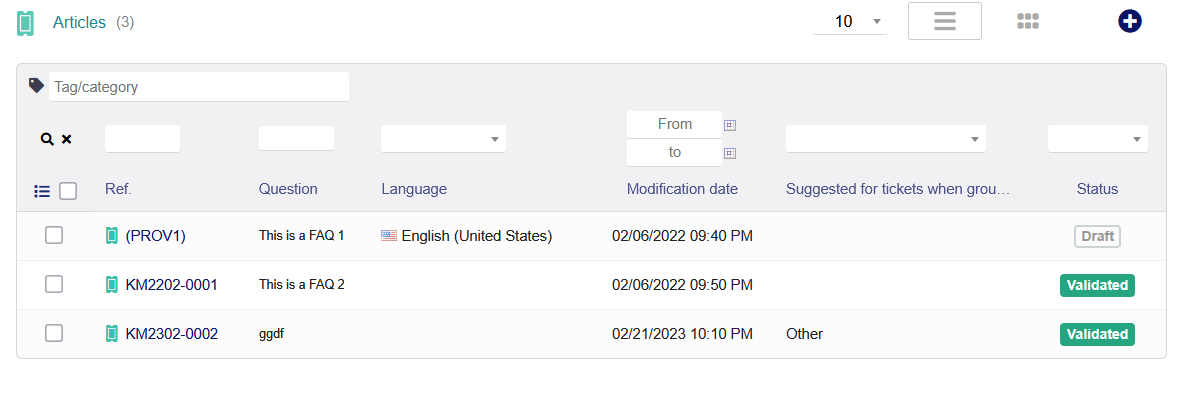
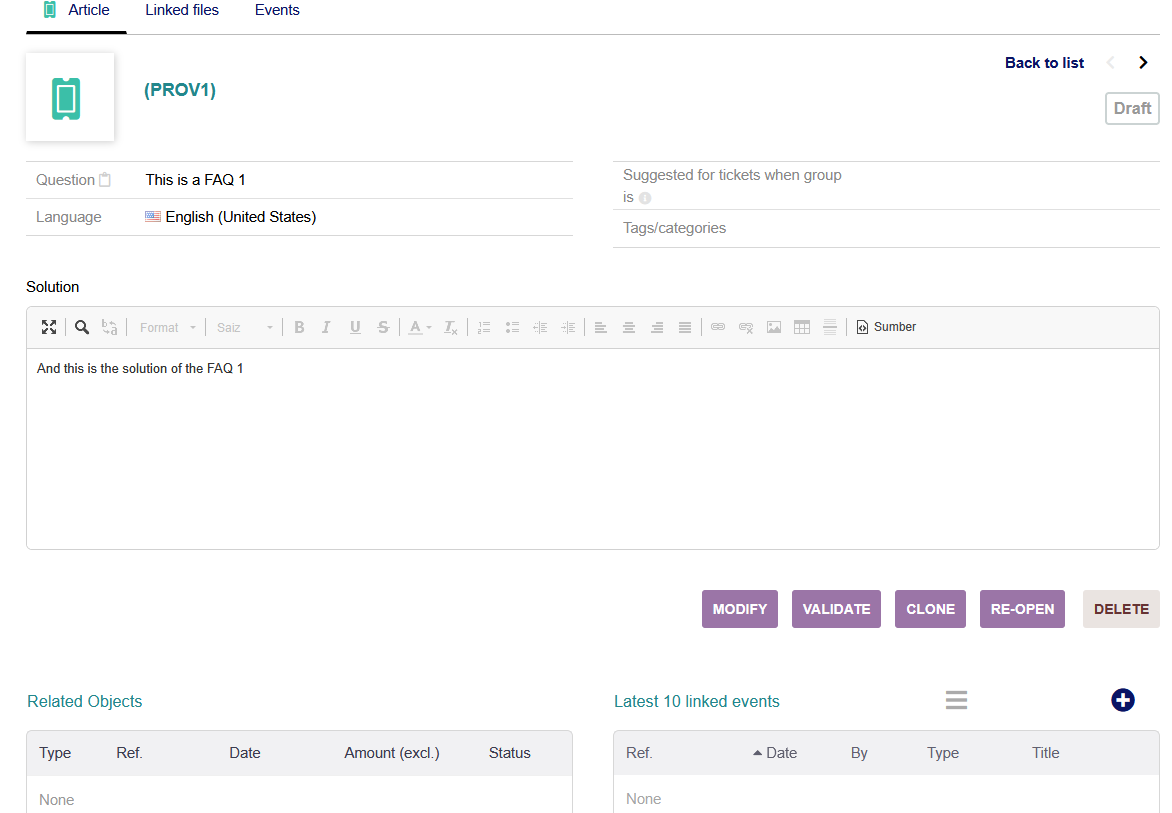
Create, organize, and manage a central repository of information.
Ticket integration
Automatically suggest or find relevant answers to customer support tickets.
Information centralization
Provides a single, accessible location for internal and external knowledge, reducing information silos.
Increased efficiency
Helps support staff and employees find answers faster, improving productivity and customer service.
Create, organize, and manage a central repository of information.
Ticket integration
Automatically suggest or find relevant answers to customer support tickets.
Information centralization
Provides a single, accessible location for internal and external knowledge, reducing information silos.
Increased efficiency
Helps support staff and employees find answers faster, improving productivity and customer service.